




Nrog rau kev txhim kho tas mus li ntawm kev lag luam hauv zej zog thiab kev nce qib ntawm nroog loj, kev thauj mus los rau pej xeem tau dhau los ua ib txoj hauv kev tseem ceeb rau tib neeg mus ncig. Chaw nres tsheb ciav hlau ua ib feem tseem ceeb ntawm kev thauj mus los rau pej xeem, qhov zoo thiab kev ua haujlwm ntawm nws cov kev pabcuam cov ntaub ntawv rau cov neeg caij tsheb mus ncig thiab kev nplij siab muaj qhov cuam tshuam tseem ceeb. Ua ib txoj hauv kev tseem ceeb ntawm kev pabcuam cov ntaub ntawv chaw nres tsheb niaj hnub, cov neeg saib xyuas tsis tsuas yog txhim kho kev ua haujlwm ntawm kev sib txuas lus cov ntaub ntawv thiab kev pabcuam zoo, tab sis kuj ua rau muaj kev nkag siab txog kab lis kev cai thiab kev pom ntawm chaw nres tsheb ciav hlau.
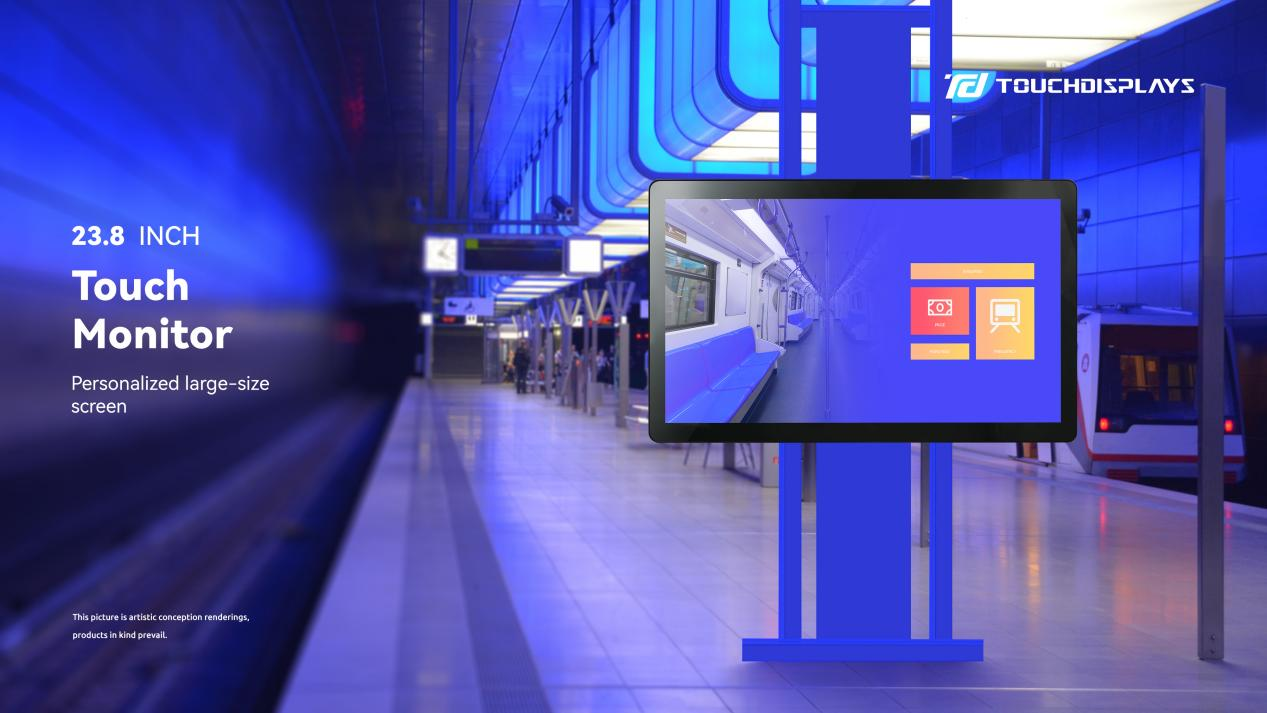
4 MainFcov yam ntxwv:
- Lub teeb ci siab: Lub teeb ci ntsa iab dua li cov zaub ib txwm muaj, uas tuaj yeem pom tseeb txawm tias nyob hauv qab lub hnub ci muaj zog.
- Kev Txhais Lus Siab: Muaj kev daws teeb meem siab, tso cai rau cov duab thiab cov ntawv qhia ntxaws ntxiv.
- Kev txuag hluav taws xob thiab kev tiv thaiv ib puag ncig: Piv nrog rau cov zaub ib txwm muaj, nws muaj kev siv hluav taws xob tsawg dua thiab tsis tsim cov tshuaj lom.
- Ntau yam teebmeem tso saib: cov ntawv nyeem dynamic, duab, yeeb yaj kiab thiab lwm yam ntsiab lus tuaj yeem tso tawm, ua kom zoo dua daim ntawv ntawm cov kev pabcuam cov ntaub ntawv ntawm chaw nres tsheb.
Cov Xwm Txheej ntawm Daim Ntawv Thov
- Kev Tso Saib Cov Ntaub Ntawv Chaw Nres Tsheb: Tso saib cov ntsiab lus xws li cov ntaub ntawv tus lej tsheb ciav hlau, cov ntaub ntawv platform, lub sijhawm tos, thiab lwm yam los pab cov neeg caij tsheb kawm cov ntaub ntawv mus ncig tshiab.
- Kev Tshaj Tawm Txhawb Nqa: Tshaj tawm cov kev tshaj tawm txhawb nqa ntawm chaw nres tsheb, kev qhia txog cov chaw zoo nkauj, kev tshaj tawm duab hauv nroog, thiab lwm yam los txhim kho lub nroog cov duab thiab kev txhawb nqa kev ncig tebchaws.
- Nyob ze rau tib neeg txoj kev ua neej: Ua si kev kwv yees huab cua hauv nroog, cov ntsuas kev tiv thaiv ib puag ncig, cov ntsuas tsheb khiav thiab lwm yam ntsiab lus, yooj yim rau cov neeg caij tsheb mus ncig thiab lub neej txhua hnub.
- Kev Qhia Txog Kab Lis Kev Cai: Tshaj tawm cov ntaub ntawv hais txog kev ua ub ua no ntawm kab lis kev cai, kev ua yeeb yam kos duab, kev ua yeeb yam kab lis kev cai, thiab lwm yam, ua kom lub ntsiab lus ntawm kab lis kev cai ntawm lub chaw nres tsheb nplua nuj thiab txhim kho qhov zoo ntawm kab lis kev cai thiab kev lom zem ntawm sab ntsuj plig ntawm cov neeg caij tsheb.
- Cov Lus Ceeb Toom Txog Kev Nyab Xeeb: Tshaj tawm cov lus ceeb toom txog kev nyab xeeb, cov lus ceeb toom thaum muaj xwm txheej ceev, thiab cov lus qhia rau kev daws teeb meem thaum muaj xwm txheej ceev kom txhim kho cov neeg caij tsheb txoj kev paub txog kev nyab xeeb thiab kev muaj peev xwm teb rau thaum muaj xwm txheej ceev.
- Kev Sib Txuas Lus Hauv Zej Zog: Tso saib cov lus ntawm cov neeg caij tsheb, kev sib qhia duab, thiab lwm yam los txhawb kev sib txuas lus thiab kev sib cuam tshuam ntawm cov neeg caij tsheb.
Kev siv cov chaw nres tsheb tso saib tuaj yeem txhim kho qhov zoo thiab kev ua haujlwm ntawm cov kev pabcuam cov ntaub ntawv ntawm chaw nres tsheb, thaum ua kom muaj kev nkag siab txog kab lis kev cai thiab kev pom ntawm chaw nres tsheb. Cov yam xws li cov ntsiab lus ntawm cov ntaub ntawv, cov qauv sib xws, kev xaiv qhov chaw, cov nqi kho thiab kev tsim qauv tib neeg yuav tsum tau coj los xav txog hauv cov txheej txheem thov kom ntseeg tau tias daim ntawv thov muaj txiaj ntsig thiab cov txiaj ntsig.
Hauv Suav teb, rau lub ntiaj teb
Ua ib lub tuam txhab tsim khoom uas muaj kev paub dhau los hauv kev lag luam, TouchDisplays tsim cov kev daws teeb meem kov ntse. Tsim muaj xyoo 2009, TouchDisplays nthuav dav nws txoj kev lag luam thoob ntiaj teb hauv kev tsim khoom.Cov Chaw Muag Khoom POS,Cov Cim Qhia Digital Sib Tham,Kov Saib Xyuas, thiabRooj Sib Tham Hauv Hluav Taws Xob.
Nrog pab pawg R&D tshaj lij, lub tuam txhab mob siab rau kev muab thiab txhim kho cov kev daws teeb meem ODM thiab OEM uas txaus siab, muab cov kev pabcuam kho kom haum rau hom lag luam thiab khoom lag luam zoo tshaj plaws.
Ntseeg TouchDisplays, tsim koj lub npe zoo tshaj plaws!
Tiv tauj peb
Email: info@touchdisplays-tech.com
Tus Xov Tooj Hu Rau: +86 13980949460 (Skype/ WhatsApp/ Wechat)
Lub sijhawm tshaj tawm: Tsib Hlis-30-2024